Pada lab kali ini kita akan melakukan konfigurasi routing static pada juniper yang berjalan secara di GNS3 simulator. Topologi yang akan digunakan adalah sebagai berikut :
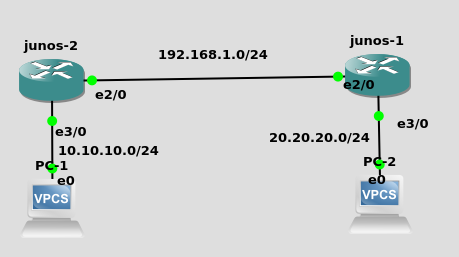
Konfigurasi pada router juniper R1 adalah sebagai berikut:
root@R1# run show configuration interfaces
ge-0/0/0 {
 unit 0 {
 family inet {
 address 192.168.1.1/24;
 }
 }
}
ge-0/0/1 {
 unit 0 {
 family inet {
 address 10.10.10.1/24;
 }
 }
}
Konfigurasi untuk router R2
root@R2# run show configuration interfaces
ge-0/0/0 {
   unit 0 {
   family inet {
   address 192.168.1.2/24;
   }
   }
}
ge-0/0/1 {
    unit 0 {
    family inet {
    address 20.20.20.1/24;
    }
    }
 }
next, add static routing junos-1 configuration with command:
# set routing-options static route 20.20.20.0/24 next-hop 192.168.1.1
in junos-2 configuration command :
# set routing-options static route 10.10.10.0/24 next-hop 192.168.1.2
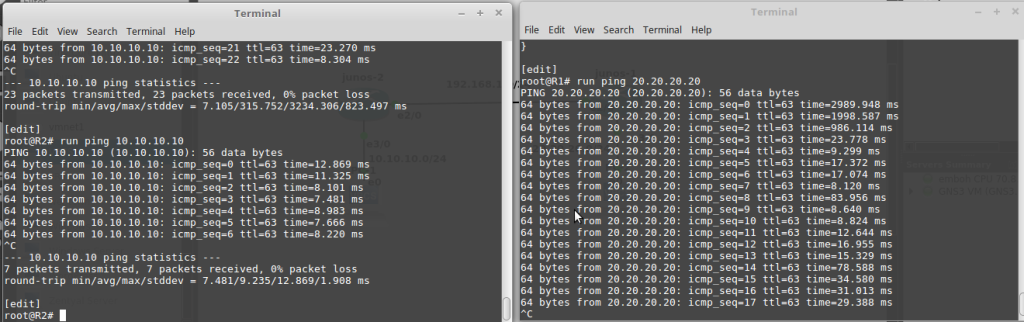
dont forget to running commit command in junos-1 and junos-2, next, test for ping from PC 1 to PC 2